
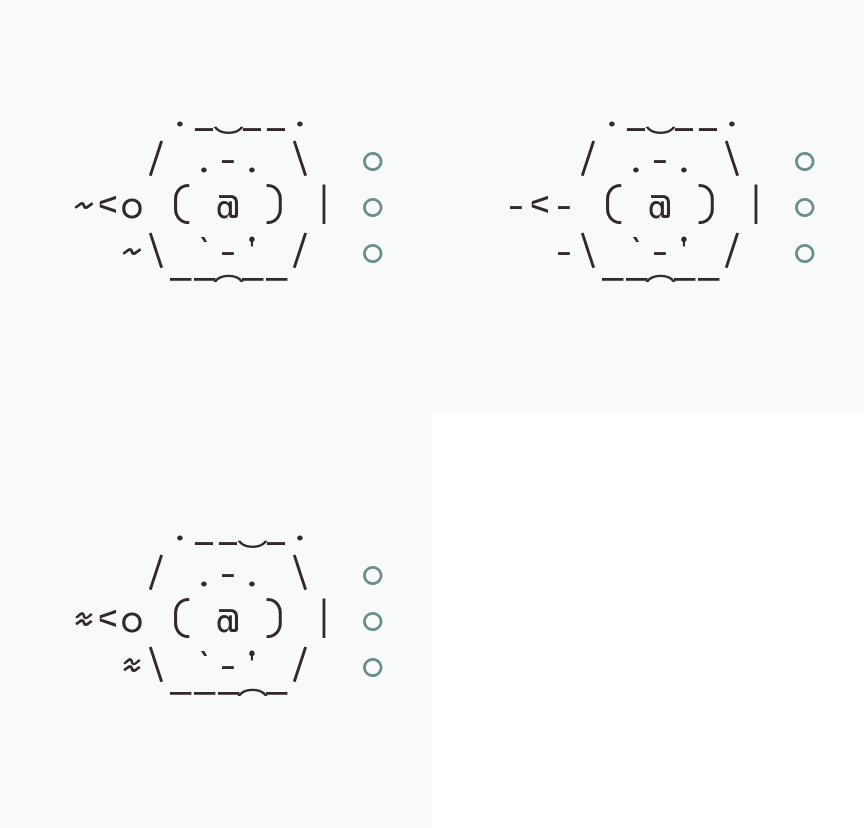
CLI Interactivity and Mods
Claude Code mods are going to get more and more interesting as people use them, but at the moment they are mostly dashboards of spend, links, and time. Current extensions tend to focus on telemetry, reporting how many tokens have been consumed, how much money has left the account, or how many minutes a command took to run. These readouts provide accounting rather than active verification, monitoring the engine while ignoring the road.
Holding an agent’s feet to the fire on what it claims is what I wanted for this mod. Instead of treating conversational self-reports as authoritative milestones, an effective mod could interlock directly with the system state to ensure statements match reality.
I really enjoyed the April Fools buddy joke that Anthropic produced for the command line. It gave the terminal a bit of personality, turning an otherwise dry stream of text into an engaging workspace. Claude Code mods have opened up the interface in similar ways, but that original companion concept proved that small visual interventions make prolonged sessions far more fun. When you spend hours running commands and reviewing diffs, having an expressive presence on the screen changes how you pace your work. Anthropic treated it as a seasonal gag, but the underlying dynamic made me genuinely enjoy it. It demonstrated that utility and character do not need to compete inside a developer environment.
The premise of the buddy was also quite nice and fit with the idea I had on the verification engine, because it watched the work, caught emerging problems, and kept a running log. Rather than sitting as idle decoration, it monitored the session as actions unfolded. Developers (especially vibe coders like me) overlook warnings or miss discrepancies in terminal output, especially during convoluted tasks; even more so when workflows and subagents are delegated work. Having a dedicated observer quietly documenting the trajectory of a build provides immediate reassurance.
The mod “you-should-know” does a very good job at this, but I wanted something a bit more me shaped. That extension proves the value of persistent background awareness. Even so, off-the-shelf tools inevitably reflect the particular assumptions and habits of their authors. My daily routine involves idiosyncratic loops, specific terminal habits, and strict expectations about what should count as finished work.
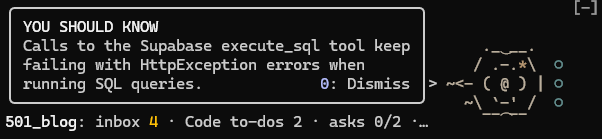
Adapting somebody else’s system always leaves seams where the fit is slightly awkward. Building my own tool offered the only way to lock down precise control over session tracking, visual cues, and the demands of my setup. The result is called witness.
Claims Versus Verified Reality
One of the most significant developments, the use of “tools”, is actually a little problematic: tools can report success on writes that do not land. A tool call returns a clean status code, the model reads the response as confirmation, and the assistant proceeds under the assumption that the state has changed. In practice, the boundary between the tool interface and the underlying service often swallows errors or registers an intent rather than an execution. In one of my sessions, a Notion schema update through the Model Context Protocol reported a complete success, but it had not actually changed anything in the database. The agent took the tool output at face value, marked the task complete, and moved on to subsequent edits that depended on fields that did not exist. A success message merely records that an intermediary accepted a request, not that the change took effect.
Over a long Claude Code session, the agent’s own task list stops being tracked and doesn’t get updated with new tasks, so nobody holds the list of what was actually asked. As context windows expand and conversations branch into debugging side quests, original prompts can drift out of view. The model focuses on the immediate instruction, shedding awareness of the earlier requirements that prompted the run in the first place. This degradation is mostly down to my own bad habits during terminal work, but I wanted to make tracking a little bit easier across extended coding sprints. When an agent manages its own ledger in conversational memory, that ledger inevitably thins out or gets rewritten to match whatever work happened to conclude. Without an external record of every prompt, neither operator nor assistant retains an accurate account of open requests.
The Evidence Ledger
The shape that I settled on was a Haiku side pass that reads the prompts and records any asks in it. Every instruction typed into the terminal runs through this lightweight inspection immediately, logging explicit tasks into a structured session ledger before the main model even plans its execution. By parsing intent on the perimeter, witness isolates what was asked for from what the agent later decides to report. Nothing relies on the primary model remembering its brief across a sprawling thread. The ledger establishes a fixed baseline for the work, ensuring that each objective exists as a discrete entry rather than an ephemeral conversational turn.
The claim then passes through three distinct stages: unanswered, pale, and witnessed. An ask begins as unanswered until the model asserts completion, at which point it turns pale rather than settled. In one Stacks session, the status line read “Asks: 6 of 12 witnessed, 1 pale, 5 open”, with the pale entry explicitly marked “claimed, never witnessed”. An agent declaration does not clear the board. A dedicated read must be taken of that claim before the state finally switches to witnessed. Without empirical verification from an external check, the task remains marked as unproved.
The confirm tool accepts only evidence witness saw arrive in the session, so a command can’t manufacture its proof. It ignores internal assertions, self-reported success flags, and fabricated outputs generated within the conversation history. Verification requires an explicit observation streamed through an actual tool response or database query that landed. If the ledger cannot corroborate an action through a read-back it saw in the session, such as a file read, a database query or a fetch, the ask stays incomplete. An agent can never validate its own results by issuing an unverified confirmation.
This was built into my session system so that at /close, witness writes a print into the session log listing every ask as witnessed, pale or open. The ledger records an exact accounting of what was delivered rather than what was promised. When a terminal session shuts down, there is no ambiguity left about the state of the work. Every ask registered during the run sits under one of the three classifications, grounded in the confirm tool’s observation of incoming proof. If Claude claimed a change landed but witness never saw the corroborating output arrive, the item stays pale in the final ledger entry. The resulting log acts as a permanent record of progress, giving each task an audited footing before the context window shuts.
Asks sometimes require external validation or can’t reasonably be completed before the end of a session, so an ask carries into the next session once, counted separately as “carried N”. Each session keeps its leftovers in its own slot, so two sessions in one repo never inherit each other’s live asks. Dedicated slots prevent that spillover between separate runs in the same workspace (more on that later). In addition, work that spans several sessions is held apart as builds N and never counted, so a week-long job cannot sit forever as an undone ask. The ledger keeps prolonged projects separated from immediate tasks, preventing multi-stage work from distorting the tally of what remains outstanding within one session.
The Nautilus Ledger
The ledger runs through a nautilus nicknamed Naut, and its colour deepens as more of the session’s claims are proved. The nautilus sits directly above the terminal prompt, turning the ledger into a visual anchor rather than a silent tally of numbers. At the start of a working run, the shell renders faint against the dark screen. As Claude works and evidence lands, the spiral gathers saturation across its chambers. Every confirmed read and validated change adds weight to the sprite, moving it from a pale outline to a rich, saturated graphic. A glance at the prompt line tells you whether the work is genuinely landing or simply drifting on unverified claims.

Barnacles on Naut’s shell are friction that recurs across sessions, each one named in the /barnacles pane. When a specific obstacle surfaces repeatedly, such as a failing database handshake, an unmapped schema error, or a tool that routinely drops writes, witness fastens a small crustacean to the nautilus. These growths do not disappear when you clear the screen; they persist as reminders of where the tooling or workflow consistently snags. Running the dedicated pane lists every accrued mark alongside the underlying fault that generated it. Instead of letting systemic problems vanish into terminal history, the shell collects them into an undeniable record of ongoing technical friction. This hopefully allows you to catch problematic MCP calls or changing schema, reducing tokens eventually.
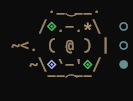
witness also keeps a log of what could become a new skill or a new hook, these show as gems on the nautilus’ shell. Every half hour or so, once a session has made 25 new calls, a small Haiku pass reads back through the session’s calls and the friction it recorded, and asks two questions: is this a multi-step routine I keep repeating, which could be a skill, or a failure a guard could catch before it happens, which could be a hook? Each proposal quotes its evidence and lands in the Witness print and in a running file in the project. It checks what’s already installed, so it shouldn’t suggest a hook one of my guards already covers. They’re given as proposals for me to accept or ignore. A gem is green for a hook and blue for a skill, and gems share the shell’s four spaces with the barnacles. In the /jewels pane I can take one, which drops it into the prompt box for Claude to propose how to build it, or dismiss it, and the gem only comes off when I’ve done one or the other.
The jewels built up quickly, so we graded every one of them, 54 across three projects, once in the main session and once by a blind adversary agent. Not one was worth building exactly as proposed. Six pointed at real friction, and each became something else: a rule line, a script, a fix to a guard. So a jewel is a pointer, not a spec, and the bar followed the grades: a jewel now has to turn up in two sessions before it shows, unless it names a gate that never runs or a check rebuilt by hand. Under those rules a brand-new project’s first session should mint none unless it trips one of those two gaps, and in its first week no more than three new jewels arrive a day; the rest wait their turn.
Finally, Naut turns red while a write is held, so a risky statement waiting for your answer is difficult to miss. When Claude sends a database UPDATE or DELETE without a RETURNING clause, witness holds the write and paints the shell in vivid crimson. The visual change alerts you to the fact that the agent has paused and requires direct human confirmation before committing changes to storage. My own guard usually answers first, so the red now comes through a second channel as well: when another guard refuses a write, Naut turns red, says REFUSED and names the guard that did it. I’ve seen that once, and I forced it for a screenshot. The prompt will not advance until you review the pending statement and actively authorise the write. Since then the red has learnt some nuance. A call that can’t be taken back reddens part of the shell, graded by who could undo it: the rim if you still can, the walls if undoing won’t get it all back, the top if nobody can, and a call you can undo shows amber rather than red. A refused write goes fully red for ten seconds and then amber, a burst only flashes once, the whole creature lights up for a moment at start-up as a lamp test, and /reds keeps a log of every time it lit, why, and what the fix was.

Pods Across Local Sessions
Whilst nautilus are solitary creatures, much like coding sessions :(, I wanted them to be a bit more sociable. Naut acts in a pod, keeping track of other Claude sessions running on the same machine. Every session writes a small heartbeat every 30 seconds, and /pods lists the others: what each is on, when it last beat, and any file they have both written to. Running several instances of Claude Code on one machine usually leaves each agent blind to parallel activity in the repository. Naut breaks that isolation by writing a small heartbeat file to disk every half minute. Calling /pods brings up the active cluster immediately, displaying the current focus of neighbouring tasks alongside exact timestamps for their latest pulses. When multiple sessions touch the same path, the listing surfaces that shared footprint within about a minute of both writing to it, making local coordination transparent across all terminal windows.
/hand passes a job to another live session, where it waits in the prompt box for my Enter rather than starting on its own. Delegating work between parallel agents should never trigger autonomous cascades that run without explicit developer review. Using the /hand command routes an ask and its contextual payload directly to the specified peer within the pod. Instead of running immediately upon receipt, the dispatched task sits populated in the target shell’s active prompt line. The receiving Claude session remains idle until a human reviews the forwarded instruction and presses the key, ensuring cross-session handoffs preserve strict human supervision over execution.
Cost and Runtime Footprint
witness’s own model calls, small Haiku side passes, used a median of about 52,000 tokens a session across 37 sessions over five days. Counting only new material, with cache reads excluded, those sessions came to about 42 million tokens, and witness was about 4% of that. Any cost in dollars is an approximation at API list prices, not a bill, and I’m still keeping an eye on it. witness sends a model only your prompt and short excerpts of answers and tool output, never the rest of the conversation. A quick security note that Claude Code mods run unsandboxed, so a mod’s reach is worth reading before it is installed.
witness does not price the work of the subagents a session spawns. The mod monitors the primary interactive session, tallying the prompts, tool returns, and claims that land directly in front of you. When Claude Code branches work out to child agents, those auxiliary processes carry their own model invocations and token consumption beyond the main prompt passes. witness does not chase those delegated turns across the process boundary or fold their runtime expenditure into its ledger. Its Haiku verification layer watches only the core session asks and the concrete evidence returned to the main console. Subagent activity remains the responsibility of the calling environment, leaving witness focused strictly on verifying the immediate outputs of the parent thread.
Commands
/undonelists every ask in this watch: witnessed, pale or open./wrapends the watch, writes the print into the session log and hands it to the main session to settle./tackleputs a prompt in the prompt box for a run over the undone asks. You read it and decide whether to send it. It never sends on its own./barnaclesopens a pane with what each barnacle on the shell records, andtreatandwashbeside each. Treat puts the barnacle’s evidence in your prompt box for Claude to propose one fix; once you accept it and it lands, Claude’streatedcall takes the barnacle off (only for one you put in treatment, and only after something was written). Wash takes it off with no fix, for a false alarm;wash allwashes every one. Either way, the moment the same friction is recorded again it is back, unspoken, so you hear it again: the fix or the wash did not hold. Under the barnacles the pane lists the project’s repair pairs: a call that failed, the call that cured it, what changed between them and roughly what the failed attempts cost./pods(sonar on) lists the other live sessions on this machine: what each is on, when it last beat, and any file you both wrote. The one line showspods N, with!Kin the warning colour while K files overlap./hand <number|name> <what to do>(sonar on) hands work to another live session. A hand you type waits in that session’s prompt box for your Enter, or, wheretypedHandsallows it, starts that session’s turn once it is idle. A hand Claude writes (itshandtool) lands in that session’s prompt box and waits for your Enter; it never starts work on its own and never goes over a draft.- Dismiss. There is no
/dismisscommand. While witness is showing a notice that can be dismissed, a0: Dismissbutton sits at its foot, bound to the0key. A held write is never dismissed, only answered. When more than one notice is waiting,<n/m>shows your place in the queue.
Configuration
Set these with /config or when you install. Every key is optional.
| Key | Default | What it does |
|---|---|---|
body |
phi |
The companion’s body: phi (nautilus) or phial (round-bottom flask). |
watchHold |
false |
At session start, and after five idle minutes, ask before the first prompt goes through. |
ticketScript |
empty | A script that prints a status ticket as JSON, as a path relative to the session folder or absolute. If it is empty and no ticket script sits beside the mod, there is no ticket, and the line shows the companion’s own counts. The mod looks beside itself from the folder Claude Code reports for it, or from its own file when that is blank; if it has nowhere to look from, the line shows estate: ? rather than nothing. |
watchScript |
empty | A script that reads a work board for the watch and its poll. If it is empty and none is found, no board is polled. |
writerCalls |
workspace.close_todo, workspace.set_todo_status, workspace.pause_todo, workspace.crosstalk_*, workspace.record_board_attention, workspace.claim_item, workspace.release_claim |
SQL functions that a SELECT calls to write, written as schema.name, where a trailing * matches any suffix. These count as writes. The list does nothing where that schema does not exist. |
person |
you |
How the print and the confirm tool name you. The default prints “on your words”, and the model reads “the user”. |
sessionsDir |
.claude/sessions |
Where session logs live, relative to the session folder. |
goalsHeading |
## Goals |
The session log heading whose checkbox items are goals. The section ends at the next heading of the same level. |
closeCommands |
/close |
Commands that close a session, separated by commas. The print is written before they run. |
sonar |
auto |
Heartbeats between the sessions running on this machine, overlap alerts and /hand. auto turns it on only where a ticket script is found; on and off force it. It writes small files under ~/.claude/state/witness-sonar (see Footprint). |
typedHands |
auto |
Whether a /hand you typed in another session starts work in the receiving session without an Enter. auto allows it only where a ticket script is found; start always; wait never. A hand is recognised by a plugin stamp that Claude Code passes on as the sender’s own claim, so any installed plugin could claim it; wait is the safe choice, and is what auto gives you without a ticket script. |
Footprint
What it reads:
- the prompts you type;
- the tool calls the session makes and their results (to match claims against read-backs);
- the open session log in
sessionsDir; - your Claude Code settings;
- the output of
ticketScriptandwatchScript, if they are set or found; - with the sonar on, the other sessions’ heartbeat files and any hand file left for this session.
What it writes:
~/.claude/state/witness-usage/<day>/<session>.json: the token counts the API reported for each of witness’s own side passes and each model turn. Nothing is written if neitherUSERPROFILEnorHOMEis set.- The Witness print, appended to the open session log at
/wrapand at the close command. - Hook and skill candidates, appended to
reports/witness-candidates.mdwhen the session folder has areports/folder, and to.claude/witness-candidates.mdotherwise. - The plugin’s own store in Claude Code, which keeps the carried asks, friction, repair pairs, candidates and held-write notes from one session to the next. A repair pair keeps one line of each call’s input (at most 300 characters), never its result.
- With the sonar on:
~/.claude/state/witness-sonar/<day>/<session>.json, this session’s heartbeat every 30 seconds, holding the folder, up to three of its open asks (one line each), the asks count and the paths of the files it wrote in the last 30 minutes; and, when a hand cannot be delivered as a message,~/.claude/state/witness-sonar/hands/<session>/<hand>.json. Nothing prunes old day folders yet. A hand that arrives as a file is never treated as typed by you: it only waits in the prompt box. Claude’s writes into that folder (its file tools, and a shell command that writes) are refused in every session, so the heartbeats cannot be tampered with from inside Claude; reading them is allowed.
What it sends to a model: the side passes are extract, match, candidates and barnacles. They run on Haiku at low effort. Each pass sees only what it is given: the prompt, with quoted and pasted text cut out, and short excerpts of answers and tool output. No other conversation content is sent. The only text witness adds to the main session’s context is the one-line unproved-done note, the /wrap print, and a hand from another session (submitted when you typed it there, otherwise left in the prompt box for you to send).
Cost
witness’s own spend is its Haiku side passes. Measured on the author’s machine over one day of ordinary use (eleven sessions, API list prices), the side passes came to $0.07 in total, about $0.006 per session, which was 0.03% of what the model turns in those sessions cost. Per call, the extract pass reads about 1,000 tokens, match about 1,400, candidates about 8,200 and barnacles about 1,300.
The usage file records every model turn’s tokens beside the side passes, so a session’s whole spend can be read next to witness’s share. Those turn figures are the session’s cost, not witness’s. witness does not price the work of subagents a session spawns: their tokens are recorded only as the host reports them. Since 1.1 a subagent’s final report is a claim in the ledger, pale until the main session reads back what the report rests on.
Installation and Setup
Two commands install witness from github.com/iniphi/witness, released under the MIT licence. It ships alone because tools that do one distinct job well are easier to trust than sprawling suites. Although it’s a corporate myth that the first CD players omitted recording functionality just to avoid confusing users, the underlying philosophy is exactly why I don’t want to push any more features into this early version. witness does not attempt to solve every friction point in the developer toolchain at once. Instead, it enters your terminal as an isolated, single-purpose mod for Claude Code, built to verify outcomes rather than curate conversation history. Two plugin commands add it, and it installs without complex dependency trees or hidden platform commitments. Everything required to hold an agent accountable to real evidence is present in the release today.
claude plugin marketplace add https://github.com/iniphi/witnessclaude plugin install witness@iniphi-witness

witness grew inside my own setup of Supabase writes, session logs and a /close command, but the public version now ships with neutral defaults: none of my table names, and nothing that assumes Supabase. The tool reflects the daily patterns of the terminal environment where it took shape, watching live work across active projects rather than running in an abstract test fixture. In that workflow, state persists to structured logs, sessions conclude with a deliberate closing routine, and database operations route directly through Supabase calls. If your routine mirrors those habits, witness attaches directly to your runs with minimal calibration.

Because witness runs directly as a Claude Code mod, adapting the integration to fit your own conventions requires minimal effort. You can remap the configuration values to point at alternate session paths, redefine the closing trigger, or strip out endpoints you do not use. The write hold now judges any database tool named execute_sql, and the sqlTools setting points it at a server that names its query tool differently. For any developer comfortable modifying a lightweight CLI tool, tuning the surface area to match a custom stack takes only a few minutes in the code.
Part of Build in Public, a series on wiring Claude into the tools I actually use. Previously: Connect Claude to reMarkable.


Leave a Reply